Add gamification user permissions
Add the following permissions to the profiles of the users that you want to use gamification.
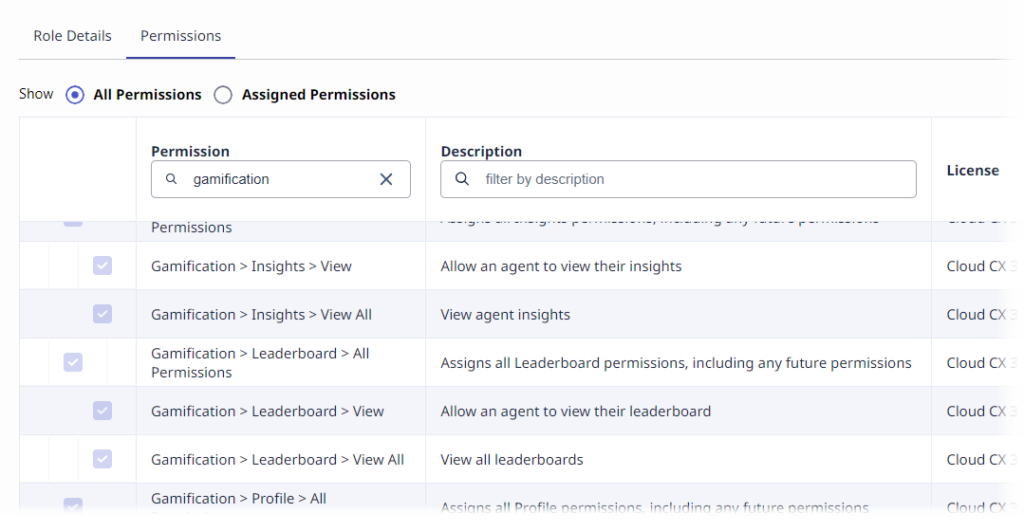
Click the image to see an example of filtering for gamification permissions.
Supervisors
- Gamification > leaderboard – View
- Gamification > leaderboard – View All Note: This permission is division-aware.
- Gamification > scorecard – View
- Gamification > scorecard – View All Note: This permission is division-aware.
- Gamification > profile – update
- Gamification > profile – view
- Ui > AgentActivity – View (Optional)
Agents
- Ui > AgentActivity – View
- Gamification > leaderboard – View
- Gamification > scorecard – View
- Workforce Management > Agent Schedule – View (Necessary for punctuality and mini schedule)
- Coaching > Appointment – Participate (Necessary for coaching widget)
- Learning > Assignment – View (Necessary for learning modules)
- Quality > Evaluation – Edit Agent Sign-off (Necessary for evaluation widgets)
For more information about these permissions, see Work with roles and permissions.
Attribute-Based Access Control (ABAC) for Gamification data based on reporting hierarchy
In addition to permissions, you can configure more granular access control for Gamification data and UIs in Genesys Cloud. To define this access, use the Attribute-Based Access Control (ABAC) policies based on the organizational reporting hierarchy. This configuration ensures that supervisors can view only agents within their reporting chain either direct reports or up to three levels deep while administrators retain full access.
- For more information about ABAC, see Attribute-based access control overview.
- For more information about creating access policies, see Create access policies.
- For more information about how to apply ABAC to gamification data see, Apply ABAC to Gamification.
[NEXT] Was this article helpful?
Get user feedback about articles.