Preview outbound dialing campaigns
Interactions for preview outbound dialing campaigns work differently from interactions for other types of outbound dialing campaigns. For information about non-preview outbound dialing campaigns, see About outbound dialing.
For preview campaigns, the outbound dialing interaction appears in your interaction list until you are ready to make the call. If the Skip functionality is configured, then you can skip an interaction by clicking Skip. A skipped interaction does not go back in queue for another agent to receive.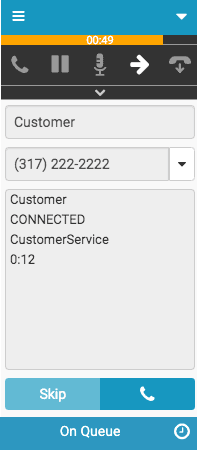
For preview campaigns, you can hold or transfer the outbound dialing interaction. Full call controls are available as with any call.
Outbound dialing interactions display the following items:
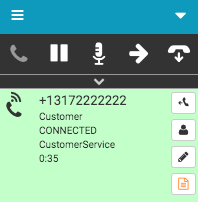
- After the call is placed, the remote phone number (+1372222222).
- The interaction type (Customer).
- The state of the interaction (CONNECTED).
- The name of the queue associated with this campaign (CustomerService).
- A timer indicating how long the interaction has been connected.
For more information, see About outbound dialing and Respond to outbound dialing interactions.
For more information about the integrations, see About the Genesys Cloud browser extensions, About Genesys Cloud Embeddable Framework, About Genesys Cloud for Microsoft Teams, About Genesys Cloud for Salesforce, and About Genesys Cloud for Zendesk.
[NEXT] Was this article helpful?
Get user feedback about articles.