Settings in the client menu
Note: This article applies to Genesys Cloud Embeddable Framework, Genesys Cloud for Chrome, Genesys Cloud for Firefox, Genesys Cloud for Microsoft Teams, Genesys Cloud for Salesforce, and Genesys Cloud for Zendesk.
You can access the settings for various items in the client.
- Click Menu > More .
- Click Settings.
Note: Not all sections or options under Settings are available in all versions of the client or for all agents.
- To open a specific Settings section, click one of the title bars, such as Call Forwarding.
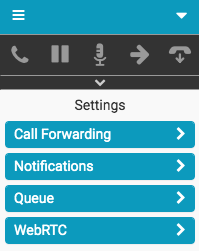
For more information, see Client interface, Turn on call forwarding, Configure notifications, Configure click-to-dial, Configure on behalf of queue, and Change your WebRTC phone settings.
For more information about the integrations, see About Genesys Cloud Embeddable Framework, About Genesys Cloud for Salesforce, About Genesys Cloud for Microsoft Teams, and About Genesys Cloud for Zendesk.
[NEXT] Was this article helpful?
Get user feedback about articles.