Client interface in the Genesys Cloud embedded clients
You can access commonly used items, such as phone selection or interactions, through Menu or Arrow at the top of the client.
You can quickly access often used tasks, views, and settings under Menu .
If your inbox contains new notifications, an orange burst appears on Menu and User Inbox .
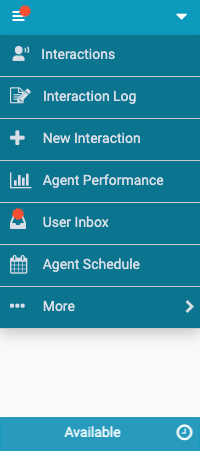
For more information, see Interactions, View and edit interaction logs, New Interaction, View agent performance statistics, User Inbox, View your schedule, Queue activation, Settings, Genesys Cloud, and Help.
You can quickly access status, phone, and call settings under Arrow .
- Change your status. Note: You can also change your status from the status bar at the bottom of the client.
- Change your phone.
- If you are using a WebRTC phone, you can change the phone settings (Chrome browsers only).
- If persistent connection is enabled, you can stop the persistent connection.
- If you have call forwarding turned on, you can access the settings for call forwarding.
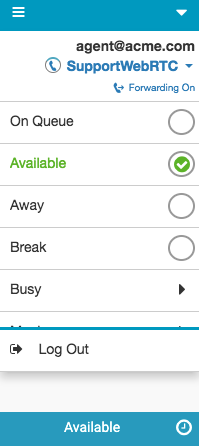
For more information, see Statuses, About phones, Call forwarding, Persistent connection, and Out of adherence.
For more information about the integrations, see About Genesys Cloud Embeddable Framework, About Genesys Cloud for Salesforce, About Genesys Cloud for Microsoft Teams, and About Genesys Cloud for Zendesk.
[NEXT] Was this article helpful?
Get user feedback about articles.