Import mined intents into a Genesys Dialog Engine Bot Flow or Genesys Digital Bot Flow
You can import mined intents and utterances into a Genesys Dialog Engine Bot Flow or Genesys Digital Bot Flow in Architect while building bot intents.
Import mined intents
To import mined intents into a Genesys Dialog Engine Bot Flow or Genesys Digital Bot Flow, perform these steps:
- In Architect, open a new or existing Genesys Dialog Engine Bot Flow or Genesys Digital Bot Flow.
- Under the Insights and Optimizations menu, click Intent Miner.
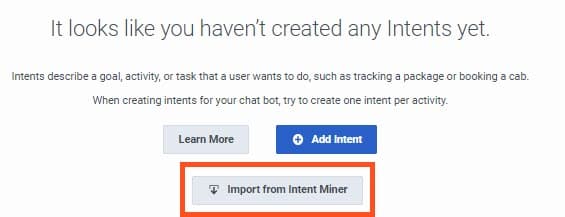
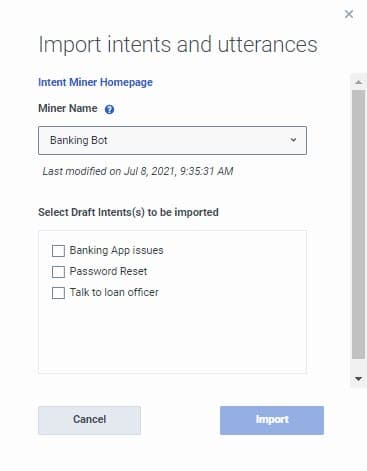
- Click Import from Intent Miner. The Import intents and utterances dialog box opens.
- To create and add a new miner, click Create a new Miner. The intent miner home page opens in a new tab.
- To mine intents from an existing miner session, follow these steps:
- Under Name, select an existing miner that you created previously in the intent miner. Note: Below the miner name, the system displays the miner’s last modified date.
- Under Select Draft Intents to be imported, enable the check box for each intent that you want to import into the flow.Note: If an intent with the same name as the draft intent exists in a bot flow, the system displays a warning that importing these intents merges any existing intents with the same names.
- Click Import.
- (Optional) Edit the intent name, delete the intent, or add more intents.
- (Optional) Click an intent to view, add, or manage utterances.
- (Optional) To import only utterances into an existing intent, open the intent and click Import from Intent Miner. The Import Utterances dialog box opens. Select the draft intents that contain the utterances, and then click Import utterances.
- Click Apply. The system trains your bot. On completion, a message appears, indicating that your bot trained successfully.
- Under Name, select an existing miner that you created previously in the intent miner.
- Continue to build the bot flow according to your organization’s specifications. For more information, see About Genesys Dialog Engine Bot Flows or About Genesys Digital Bot Flows.
[NEXT] Was this article helpful?
Get user feedback about articles.