Directory overview
The Directory lists the people, groups, favorites, and locations in your organization. To browse the Directory, use the Search field or click the categories on the left side.
To access the Directory, click Directory and then My Organization.
To access the Directory, click Menu > User Management > User Directory.
| UI element | Action |
|---|---|
| Search | To search the Directory, type a keyword. |
Category links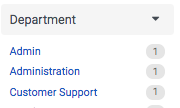 | To filter the Directory or search results, click the category links. Note: Genesys Cloud displays the top 10 filter values for each category. |
People Groups Chat Favorite More | To call a contact, open a chat, add to favorites, or expand the menu for more contact options, click one of these options. |
Related tasks
[NEXT] Was this article helpful?
Get user feedback about articles.