Access the Product Support portal via Okta
Logging in to Product Support through Okta is the recommended best practice because it provides a secure, consistent, and streamlined sign-in experience. Okta helps ensure that users access Product Support through the approved authentication path and reduces the need to manage separate credentials.
Why use Okta to access Product Support?
Logging in through Okta is recommended because it:
- Provides a secure and approved access method
- Reduces the need to remember or manage separate passwords
- Uses your organization’s existing authentication process
- Helps ensure that only authorized users can access Product Support
- Creates a consistent sign-in experience across Genesys applications and services
Before you begin
Make sure that you have:
- The Genesys Online Account Creation Notice email
- Access to the Genesys Okta portal
- The required permissions to access Product Support
- A valid Product Support account, if applicable
- Completed any required multifactor authentication setup for Okta
Log in to Product Support through Okta
To access Product Support through Okta, follow these steps:
- Open the Genesys Okta portal.
- Perform the steps provided in the Genesys Online Account Creation Notice email.
- Sign in with your credentials from the email.
- Complete multifactor authentication, if prompted.
- In the Okta application dashboard, search for or locate the Customer Care – MySupport tile.
Click the image to enlarge.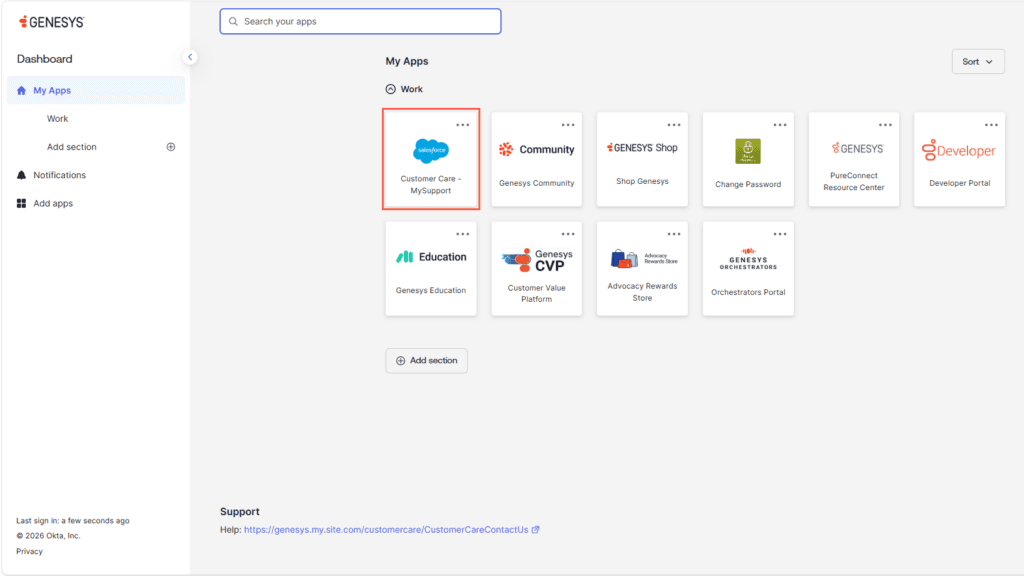
- Click the Customer Care – MySupport tile.
- After authentication completes, Okta redirects you to the portal.
- Verify that you are signed in with the correct account.
[NEXT] Was this article helpful?
Get user feedback about articles.