Concurrent licensing model billing overview
In a concurrent licensing model, Genesys charges for the maximum number (peak) of concurrent (simultaneous) users during a billing period. To support shift changes, we disregard usage peaks shorter than 30 minutes in duration. Usage peaks can occur in non-contiguous intervals. The charges reflect the highest Genesys Cloud level license that users were assigned during the billing period. Concurrency calculations are limited to a single Genesys Cloud organization. We do not support concurrency calculations between multiple orgs.
If you select a concurrent license model, all Genesys Cloud CX 1, Genesys Cloud CX 2, Genesys Cloud CX 3, or Genesys Cloud CX 4 users are licensed as concurrent.
Concurrency calculation
Users who hold a certain license during the usage period are eligible for concurrency calculation.
To calculate concurrency, Genesys does the following:
- Look holistically at time to determine how many of the whole pool of users were logged in at that moment. For this, we use presence data from the API.
- For example:
- Time A, 500 users
- Time B, 503 users
- For example:
- Build a data set that shows all the quantities and the amount of time (or number of sample slices).
- For example:
- 500 users, 31 minutes
- 503 users, 6 minutes
- For example:
- Drop any quantities that don’t accrue a non-contiguous quantity of time of at least 30 minutes.
- For example:
- 500 users, 31 minutes (Peak)
- For example:
- Since the 500 users for 31 minutes isn’t necessarily contiguous, the actual discrete users in this peak could be much greater than 500 users. Therefore, we build a data set of the users who were present in the greatest number of time slices until we reach the peak. We then drop the users below that threshold.
Self-service reconciliation
To understand why a given user was included in this count, follow these steps:
- To check the list of the users counted, download the Concurrent Usage reports. Note: All of these users will be logged in according to analytics data.
- With the exception of WEM add-on, these users will have had the license in question. This is visible on the People page. You can check on their current license there. Note: It is possible that this license was changed over time.
- You can check their logged in times for each user in the Agent Status Detail view.
- For example, the status view for a single user might look like this:
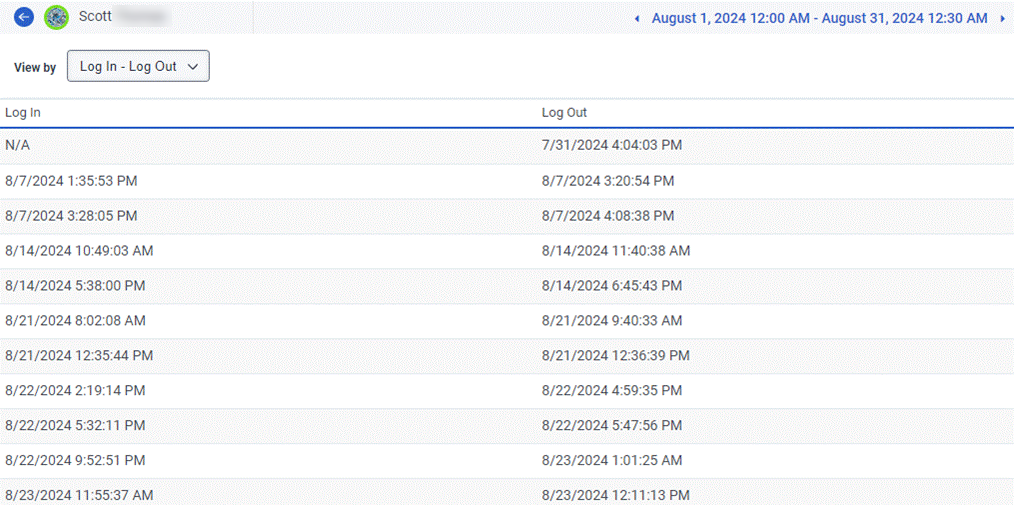
- For example, the status view for a single user might look like this:
- If you’d like to automate the collection of this information, you can query the User Status Detail API.
[NEXT] Was this article helpful?
Get user feedback about articles.