Predictive Engagement tracking snippet
About the tracking snippets
Before you begin
Read about the type of data that Genesys Predictive Engagement tracks and how to ensure that you track visitor data in a regulatory-compliant manner. Understand the implications of using ad blocking software. Finally, learn how the tracking snippet works and the types of tracking snippets available.
Copy the snippet
Genesys Predictive Engagement provides a tracking snippet that you can copy and paste. Since you are logged in to Genesys Cloud CX, the tracking snippet already contains your organization ID and region.
- Determine which snippet to use.
- In Admin in Genesys Cloud CX, open the Global Settings page and then click the Tracking Snippet tab.
- Copy the tracking snippet.
- Paste the snippet. For more information about where to paste the snippet, see Deploy the snippet.
Ad blockers
Ad blockers are plug-ins or browser extensions that improve page load times and minimize questionable tracking. The majority of ad blockers tested with out-of-the-box settings do not interfere with Genesys Predictive Engagement’s tracking capabilities. However, there are a couple considerations if you use uBlock Origin:
- uBlock Origin disables Genesys Predictive Engagement’s tracking web beacons; this effectively prevents Genesys Predictive Engagement’s tracking capabilities.
- uBlock Origin and uBlock Plus Adblocker block popular tag managers such as Adobe Tag Manager, Google Tag Manager, and more.
Types of tracking snippets and recommendations
Website snippet
The Website snippet provides tracking support to traditional webpages that contain little or no dynamic content. Traditional websites load a new HTML page whenever the visitor navigates to a different URL. To provide tracking support to traditional webpages, the Website snippet calls ac('pageview') each time the web browser loads a new page.
SPA snippet
The SPA snippet can track activity on Single Page Applications (SPAs). SPAs load dynamic content on demand without requiring a hard reload of the HTML page. The SPA snippet can also track when visitors click relative links, which the Website snippet does not. The SPA snippet works on SPAs such as Angular, React, and Vue.js. For more information about the additional tracking options available with the SPA snippet, see autotrackURLChange.
Snippet recommendations
| If you have this type of website… | Use this snippet… |
| Not sure | SPA |
| Mix of traditional and SPA pages | SPA |
| Traditional pages only | Website |
Deployment overview
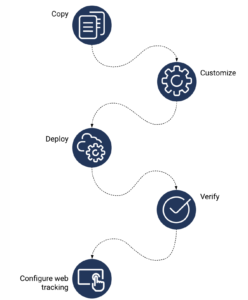
- Copy the snippet.
- (Optional)Customize the snippet.
- Deploy the snippet.
- Verify that the snippet works.
- Configure web tracking.
(Optional) Customize how the snippet tracks activity
You can customize how the snippet tracks activity on your website.
- To customize how Genesys Predictive Engagement tracks activity on your website, see About event tracking with tag managers.
- To customize the Genesys Predictive Engagement tracking snippet with functions, see the Journey JavaScript SDK.
Deploy the snippet
About deploying the snippet
- Deploy the widgets transport above the location where you deploy the Genesys Predictive Engagement tracking snippet.
- Deploy the Genesys Predictive Engagement tracking snippet on the main window of the website to track.
- Paste the tracking snippet in the head section of the website template page before the closing tag.
- Do not deploy the tracking snippet in an iframe.
- The Genesys Predictive Engagement tracking snippet loads JavaScript asynchronously without slowing down page loading. For more information about how the tracking snippet works, see About the tracking snippet.
Deployment instructions
- To deploy the tracking snippet manually, paste the copied snippet on your website.
- To deploy the tracking snippet using Google Tag Manager, see Deploy the tracking snippet with Google Tag Manager.
- To deploy the tracking snippet using Adobe Launch, see Use Adobe Launch with Genesys Predictive Engagement.
- To deploy the tracking snippet using another tag manager, see the tag manager vendor’s instructions.
Verify that the snippet works
After deploying the tracking snippet, use Live Now to verify that Genesys Predictive Engagement is tracking your website activity. You should see an update every 4-5 seconds.
Troubleshoot the snippet
If the tracking snippet does not work properly when you load your web pages, check the following:
- Is the snippet on the correct page?
- Is the snippet in the correct place in the page header?
- Are the parameters defined correctly?
- Are there any typos, missing characters, or extra white space?
- Were any characters replaced with their printable equivalents?
- Is the domain on the list of allowed domains?
For more suggestions, see about deploying the snippet.
Error reference
| Error code | Description |
| 403 error | Is your domain in the list of allowed domains? |
| 404 error | Is there extra white space in the snippet?
Note: In a URL, white space is encoded as %20. |
| Bad request | Is there extra white space in the snippet?
Note: In a URL, white space is encoded as %20. |
| Initialization error | Are there any of the following in the snippet:
|
Call the tracking snippet
After the tracking snippet is on your webpages, call it using one of the following:
- If you use the traditional snippet, call
ac('init')to initialize the Journey JavaScript SDK. For more information, see init. - If you use the SPA snippet, use
ac('load')to load the autotrackUrlChange module and initialize the Journey JavaScript SDK. For more information, see load and autotrackURLChange.
After you initialize the Journey JavaScript SDK, Predictive Engagement tracks pageview events when visitors arrive on your webpages. For more information, see Tracking methods.
Other tracking options
Web tracking
Use the Web tracking feature to specify the domains to track and configure web-related tracking settings.
Custom modules
Use a set of modules to enhance the functionality that the Journey JavaScript SDK provides.
Event tracking with tag managers
Use your tag manager to build custom tags and triggers that define how Predictive Engagement tracks activity on your website. For more information, see About event tracking with tag managers.
Domain and subdomain tracking with cookies
Use cookies to track domains and subdomains. For more information, see Cookies and Advanced tracking with cookies.
[NEXT] Was this article helpful?
Get user feedback about articles.