Configure on behalf of queue
Note: This article applies to Genesys Cloud Embeddable Framework, Genesys Cloud for Chrome, Genesys Cloud for Firefox, Genesys Cloud for Microsoft Teams, Genesys Cloud for Salesforce, and Genesys Cloud for Zendesk.
You can configure the client to remember the last queue that you selected. Use this configuration when you want to place multiple interactions on behalf of the same queue.
Note: A queue name does not persist in the On Behalf of Queue box until you successfully place an interaction on behalf of a queue.
- Click Menu > More .
- Click Settings.
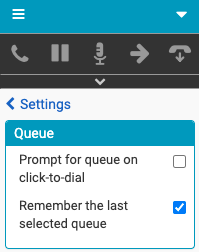
- Click Queue.
- In the Queue section, select or clear the Remember the last selected queue check box.
For more information, see Make a call, Send an email, Send an SMS message, and Troubleshoot on behalf of queue issues.
For more information about the integrations, see About Genesys Cloud Embeddable Framework, About Genesys Cloud for Salesforce, About Genesys Cloud for Microsoft Teams, and About Genesys Cloud for Zendesk.
[NEXT] Was this article helpful?
Get user feedback about articles.