Change Mac desktop app preferences
Change notification, general, chat, password, voicemail PIN, and language settings in the Mac desktop app in Preferences. See Download the desktop app to get the free application.
To access User settings, from the sidebar, click your profile picture. Then click Preferences.
To access User settings, at the top right, click your avatar. Then click Preferences.
Change the appropriate setting in one of the Preferences tabs.
Genesys Cloud alerts you to events including new direct and group chat messages or incoming calls. You can control these notifications.
From Preferences, click the Notifications tab. Change your settings to suit your needs.
| Setting | Description |
|---|---|
| Allow Pop-up Notifications | Choose whether you receive desktop notifications.
|
| Disable Device Profile Notifications | Choose whether to receive notifications about connecting or reconnecting audio devices. |
| Show Pop-up Notifications for Group Chats | Choose whether you receive notifications about new group chat messages. Direct messages and mentions in group chat rooms always create notifications, even if you hide all group chat notifications.
Note: To see the Show Pop-up Notifications for Group Chats option, first enable Allow Pop-up Notifications. If you do not enable Allow Pop-up Notifications, then you do not receive group chat notifications. |
| Play Sound | Choose whether notifications make a sound. If you do not enable Allow Pop-up notifications, sounds do not play for messages even if you select Play Sounds. |
| Sound to Play | If you chose to play sounds for notifications, you can choose the sound you prefer to hear. |
| Bounce Dock Icon | Choose whether and how you want the Genesys Cloud app icon to bounce in the dock when you receive a new message. If you set the dock icon to bounce, it bounces even if you have not selected Enable Desktop Notifications. |
Change the default settings for automatic checking for desktop app updates.
From Preferences, click the General tab. Change the settings to suit your needs.
| Setting | Description |
|---|---|
| Automatically check for desktop application updates | To have Genesys Cloud automatically check for Mac desktop app updates, enable Automatically check for desktop application updates. |
You can change how chats and the chat roster appear.
From Preferences, click Chat. You can also access chat preferences from the chat panel. You can adjust the following preferences:
| Category | Settings |
|---|---|
| Sort Order | Choose how Genesys Cloud lists chat rooms in the chat roster.
|
| Set Notification Volume | To open the Sound preferences, click Set Notification Volume. Adjust the slider for the Chat Notification Volume setting. |
| Media | Choose how media, such as images, social media, and videos, appear in your chats.
For more information about images and media in chats, see Send media and files in a chat. |
| Display Density | Choose the amount of spacing between chat room names in the chat roster.
|
| GIPHY Keyboard | When using the /giphy chat command, choose how you want the gif selection to appear.
Note: Your admin can disable the /giphy function. |
To change your password, from Preferences, click Password.
- Complete the three fields. As you type the new password, Genesys Cloud prompts you with suggestions to meet the requirements. The default password requirements are as follows:
- The minimum length is eight characters.
- The maximum length for a password is 400 characters.
- Passwords must contain at least one number, one special character, one uppercase letter, and one lowercase letter.
- You cannot reuse any of your previous 10 passwords.Notes:
- Your administrator can set different minimum and maximum requirements for your organization.
- Do not copy and paste a password to set it. If your password contains double-byte characters (for example, Japanese or Chinese characters), you cannot log in later with the keyboard.
After you complete the fields, click Change Password.
Note: If your new password doesn’t fit your organization’s minimum and maximum requirements, Genesys Cloud displays a message with suggested changes to meet the requirements.- Use your new password the next time you log in to Genesys Cloud.
Use your voicemail PIN to access your voicemail from your phone when you are not logged into Genesys Cloud.
To change your voicemail PIN, from Preferences, click Voicemail PIN.
- Enter your new PIN in the fields.
- Click Change PIN.
Select your preferred language.
- From Preferences, click Language.
- From the list, click the name of your preferred language.
- Click Apply and reload. Genesys Cloud refreshes with your language selection.Note: This procedure changes your language preference for this session. For more information about how to change your language preference for future sessions, see Log in for the first time.
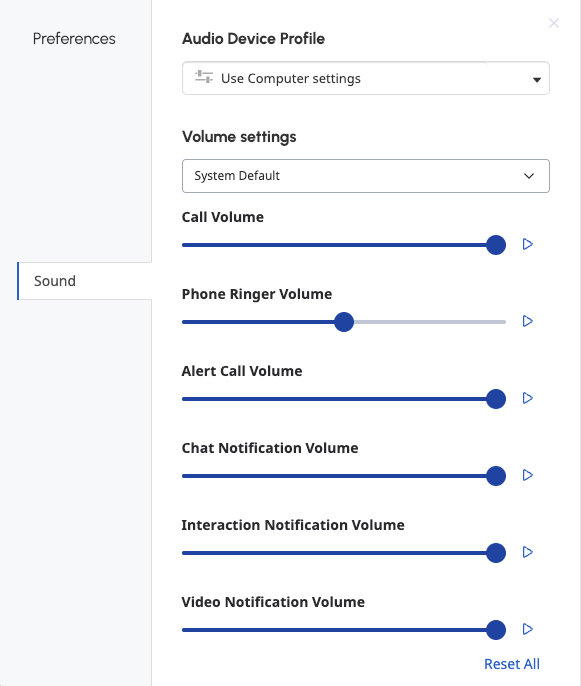
Audio Device Profile
You can test and adjust sound levels for input and output devices and set up audio profiles in your sound preferences. For more information about audio device profiles, see Create a new audio profile.
Volume settings
To adjust and test your sound preferences, do the following:
- From the device list, select the device you want to adjust.
- Move the slider to adjust the volume levels for these settings:
Call Volume The volume level for the incoming voice on a WebRTC call. Phone Ringer Volume The volume level for incoming phone call alerts. Chat Notification Volume The volume level for incoming chat alerts. Interaction Notification Volume The volume level for agents' incoming interaction alerts. Video Notification Volume The volume for video notifications. Alert Call Volume While on Call The volume for incoming calls while you're on an existing call. - To test the volume levels for each setting, click Play .
Ringtones
- From the list, select a ringtone. Genesys Cloud plays a sample of the ringtone.
- (Optional) Repeat step 1 until you find the ringtone that you want to use.
Advanced mic settings
Genesys Cloud's microphone sound processing provides the best audio experience for most environments. In some environments, you may improve the audio experience by disabling some or all microphone sound processing.
To change advanced microphone settings, follow these steps:
- Click Advanced Mic Settings. The panel expands to show the advanced microphone settings.
- Disable or enable the following settings:
- Automatic Mic Gain controls microphone volume levels. Disable this option if you experience microphone volume fluctuation.
- Echo Cancellation removes from the microphone sound that comes through your speakers. If you do not use speakers, this option has no effect on your sound quality.
- Noise Suppression removes background noise. In some situations, the microphone may be unable to separate your voice from the noises around you. Try to position your microphone closer to your mouth and speak louder before you disable this option.
You can set your preference for how you want to join video chats.
To set your video preferences, from Preferences, click Video.
- To join video chats with your microphone off, enable Mute my mic when joining.
- To join video chats with your video off, enable Disable my camera when joining.
- To join video chats automatically, without a confirmation window, enable Join conference automatically.
- To join video chats with video popped out, enable Always popout my video when joining.
The following permissions:
- To view your direct routing backup settings: Routing > DirectRoutingBackup > Selfview
- To edit your direct routing backup settings: Routing > DirectRoutingBackup > Selfedit
- To delete your direct routing backup settings: Routing > DirectRoutingBackup > Selfdelete
You can set your preferred direct routing options.
To set your direct routing preferences, from Preferences, click Direct Routing.
Primary backup
- Under Primary Back up, click Select Primary Backup Routing Options.
- Click one of the following options.
- Queue: To specify a queue as your primary backup, select Queue. Under Queue, click Select Primary Backup Queue and begin to type the name of the queue. Click the queue when it appears in the list.
- User: To specify another user as your primary back, select User and follow these steps.
- Under User, click Select Primary Backup User and begin to type the name of the user and click the user when they appear in the list.
- (Optional) To set a queue as a secondary backup, under Secondary Backup, click None and begin to type the name of the queue and click the queue when it appears in the list.
- (Optional) To bypass the configured timeout and immediately forward interactions to your backup, enable Assign to backup immediately.
- To save your selections, click Save Changes. Or, to clear your direct routing preferences, click Clear Settings.
The following permissions:
- To add an agent greeting: Architect > User Prompt > Add
- To edit an agent greeting: Architect > User Prompt > Edit
- To view an agent greeting: Architect > User Prompt > View
- To see your own greeting: Telephony > selfAgentGreeting > View
- To edit your own greeting: Telephony > selfAgentGreeting > Edit
As an agent, you introduce yourself for every ACD voice interaction. If your admin enables the feature, an agent greeting can save time and increase your efficiency.
To set an agent greeting, do the following:
- From Preferences, click the Agent Greetings tab.
- To begin to record your greeting, first, from the list, select the appropriate language, then do one of the following steps:
- To record a greeting for incoming interactions, under Inbound, click Start recording .
- To record a greeting for outgoing interactions, under Outbound, click Start recording .Notes:
- If a greeting exists and you record a new greeting in the same language, Genesys Cloud replaces the existing greeting. Alternatively, to delete an existing greeting, under Available Greetings, beside the greeting you want to delete, click More and then Delete.
- You can also upload a .wav file of a prerecorded greeting. To upload a prerecorded greeting, click Upload and select the .wav file.
- Your greeting can be up to 15 seconds long.
- Click Save recording. Notes:
- To make a greeting your default greeting, under Available Greetings, click More and then Mark as default.
- If no language-specific greeting is available, Genesys Cloud plays the default greeting.
- If the detected language of an incoming interaction fails to match any available greetings, Genesys Cloud plays the default greeting if one exists. If no default greeting exists, Genesys Cloud plays a tone instead.
- Genesys Cloud only plays a greeting for transfers or conferences when you transfer an interaction to a queue or when a queue participant is added to a conference. If you transfer directly to a user, Genesys Cloud does not play the greeting.
- If call recording is enabled, agent greetings are included as part of the trunk-side or station-side recordings.
- Your administrator can review your greeting and assign greetings to agents programatically. For more information, see User prompts in Architect.
- To make a greeting your default greeting, under Available Greetings, click More and then Mark as default.
[NEXT] Was this article helpful?
Get user feedback about articles.